

Industry News

Staying Safe in the Heat: Preventing Heat Illness for Employees
Author, Jadyn Brandt, Client Communications Coordinator, Rancho Mesa Insurance Services, Inc.
As we enter into the summer months, warm weather conditions create a new level of risk for employers. High temperatures and greater sun exposure can pose a danger to employees working both outdoors and indoors. Proper heat protection and preparation are necessary to keep employees safe.
Author, Jadyn Brandt, Client Communications Coordinator, Rancho Mesa Insurance Services, Inc.

As we enter into the summer months, warm weather conditions create a new level of risk for employers.
High temperatures and greater sun exposure can pose a danger to employees working both outdoors and indoors. Proper heat protection and preparation are necessary to keep employees safe.
The Occupational Safety and Health Administration (OSHA) reports over 70% of fatalities from heat illness occur in the first week of work. OSHA attributes this statistic to a lack of acclimatization, or proper adjustment to the changing temperatures.
Training employees on how to build tolerance to and protect themselves from the heat, and what to do if a person is showing signs of heat illness is essential when temperatures are high.
Rancho Mesa has a number of training and reporting resources available for clients through the SafetyOne™ platform and the RM365 HRAdvantage portal. These resources include:
SafetyOne™
Heat Stress Online Training Courses
Toolbox Talks for weekly safety training
Observation Reports for documentation and issue identification
Mobile Forms to collect safety data
Heat Advisories that can be sent through the Company News function
RM365 HRAdvantage™ Portal
OSHA 300 logs for incident documentation
Register to attend Rancho Mesa’s Heat Illness Prevention workshop on June 12th, 2026 at 9:00 am.
Completing this training counts towards earning the RM365 Advantage Safety Star™ Program certificate.
Well‑Being at Work: Observing Mental Health Awareness Month
Author, Jadyn Brandt, Client Communications Coordinator, Rancho Mesa Insurance Services, Inc.
Since 1949, May has been recognized as Mental Health Awareness Month. It is a time to raise awareness on mental health and share resources within your organization.
Author, Jadyn Brandt, Client Communications Coordinator, Rancho Mesa Insurance Services, Inc.

Since 1949, May has been recognized as Mental Health Awareness Month. It is a time to raise awareness on mental health and share resources within your organization.
According to the Centers for Disease Control and Prevention, over 50% of the people in the United States will be diagnosed with a mental illness at some point in their lives. And, the World Health Organization (WHO) reports conditions like anxiety and depression lead to a trillion dollars of lost productivity worldwide, every year.
Both employers and employees benefit when mental health is addressed in the workplace, and when proper resources are available to support staff members. In fact, the WHO also found that for every $1 invested into treatment for depression and anxiety, there is a return of $4 in improved health and ability to work.
Mental Health resources are available in the RM365 HRAdvantage™ portal, including law breakdowns detailing what kind of mental health coverage employers are required to offer, Q&As that cover common questions about employee mental health, and guides outlining ways to support employees’ mental health.
Some of the ways our HR experts recommend employers provide support to their employees include:
Providing time for employees to slow down and rest
Offering paid time off, mental health benefits, and flexible schedules
Offering an Employee Assistance Program (EAP)
Making accommodations when possible
Creating spaces for non-work related connection
Promoting good mental and physical health in the workplace
For assistance accessing these resources, contact your client technology team. Rancho Mesa clients can also submit HR questions to a live expert through the HR portal.
New State Overview Screen in the RM365 HRAdvantage™ Portal
Author, Jadyn Brandt, Client Communications Coordinator, Rancho Mesa Insurance Services, Inc.
Staying in compliance with state laws is key to an organization’s success. Rancho Mesa’s RM365 HRAdvantage™ portal is making compliance easier for business owners and HR managers through the new State Overview screen.
Author, Jadyn Brandt, Client Communications Coordinator, Rancho Mesa Insurance Services, Inc.
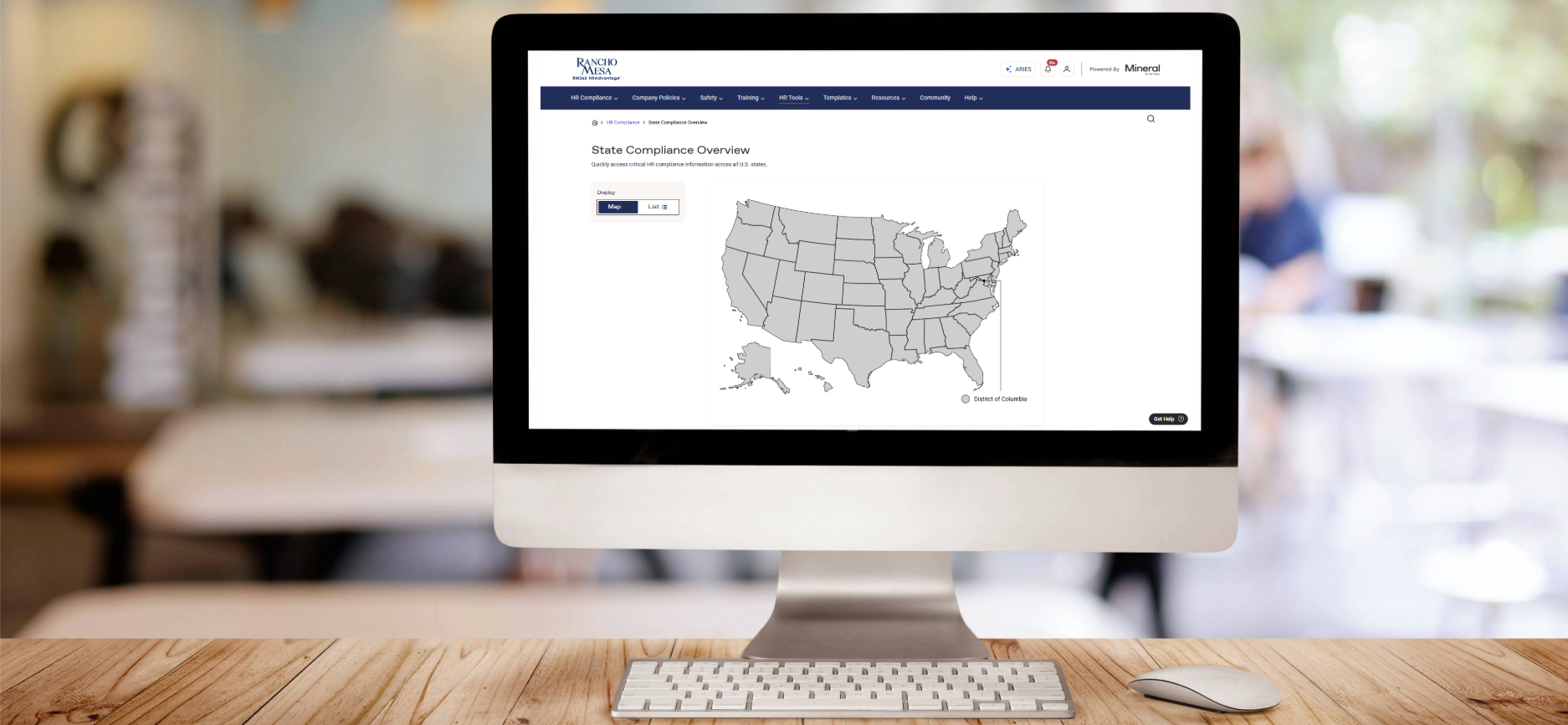
Staying in compliance with state laws is key to an organization’s success. Rancho Mesa’s RM365 HRAdvantage™ portal is making compliance easier for business owners and HR managers through the new State Overview screen.
Accessing the State Overview Screen
The State Overview screen can be found under the HR Compliance tab.
Hover over the “HR Compliance” in the navigation bar and click on “State Overviews.”
You will then see an interactive map of the United States. On the left side of the screen, you can switch between a Map and a List view.
Select the state you want to view an overview of.
State Overview
Select a state from the map or list to view the overview.
The overview includes:
State minimum wage rates and laws
Key laws specific to the state you have selected
Toolkits for hiring, recruiting, and termination
Recent law alerts and updates
List of all state-specific laws available in the portal library
For questions about accessing State Overviews or other HR portal resources, contact your client technology team member.
New RM365 HRAdvantage™ Law Comparison Tool
Author, Jadyn Brandt, Client Communications Coordinator, Rancho Mesa Insurance Services, Inc.
A new tool has been added to Rancho Mesa’s RM365 HRAdvantage™ portal for businesses that operate in multiple states. The new Law Comparison Tool simplifies multi-state compliance, allowing users to compare employment laws across multiple U.S. states and identify legal differences.
Author, Jadyn Brandt, Client Communications Coordinator, Rancho Mesa Insurance Services, Inc.
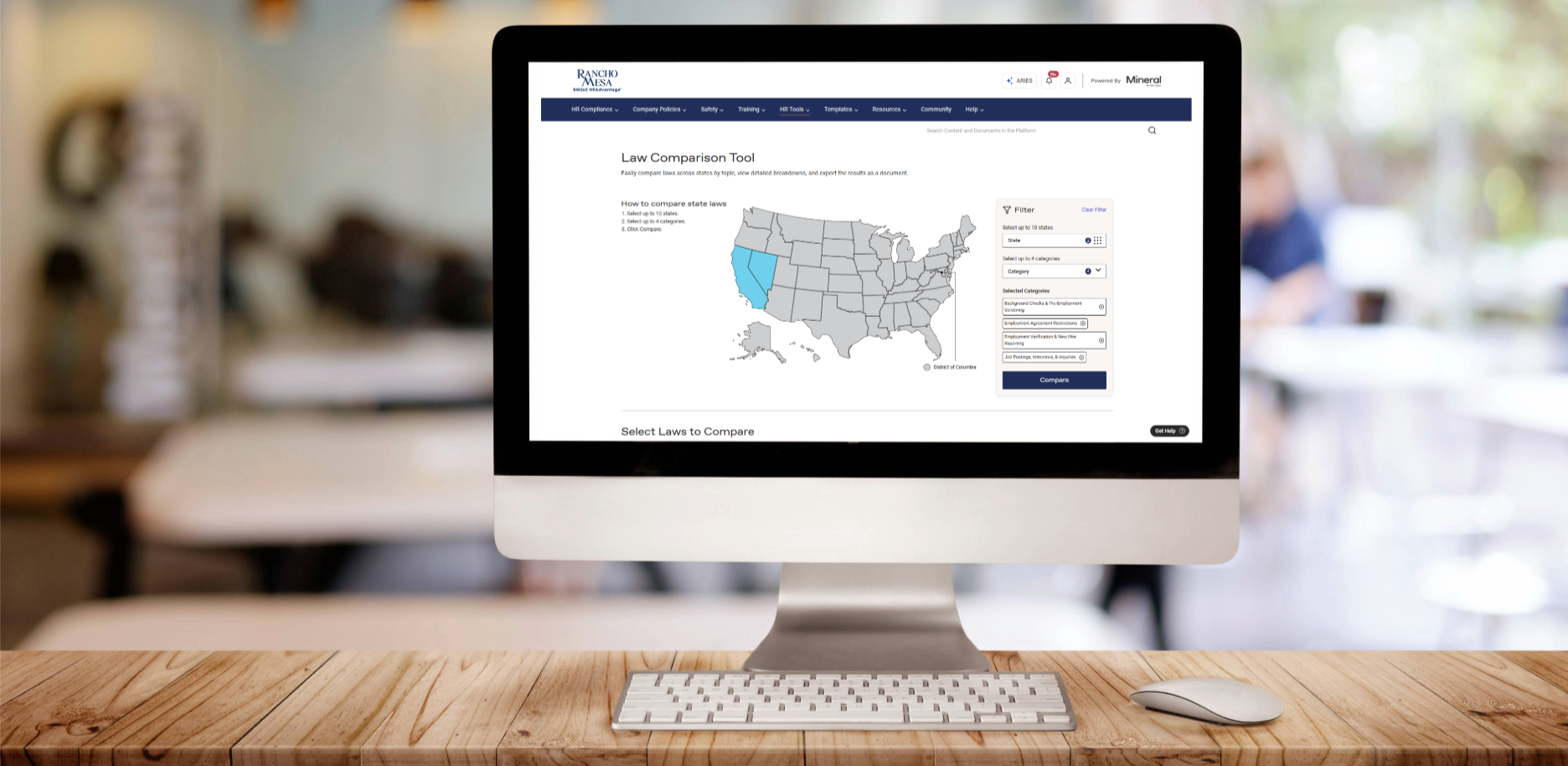
A new tool has been added to Rancho Mesa’s RM365 HRAdvantage™ portal for businesses that operate in multiple states.
The new Law Comparison Tool simplifies multi-state compliance, allowing users to compare employment laws across multiple U.S. states and identify legal differences.
Users of the HR portal can now:
Compare laws from up to 10 states and 4 law categories
Sort by specific law categories or subcategories
Export results in Word or Excel
How to Use the Law Comparison Tool
The Law Comparison Tool can be found under the “HR Tools” dropdown menu in the Navigation bar in the HR portal.
Using either the interactive map or the filters on the right-hand side of the page, select up to 10 states and up to four law categories, then click the “Compare” button.
The page will generate a list of corresponding laws in each state you have selected. Use the check box next to each law to select up to 10. Some laws will be state-wide, while others are specific to a city or county.
The portal will display your selected laws side-by-side for easy comparison. Click the “Email Comparison Download” button to generate a Word document or Excel spreadsheet comparison.
Contact your client technology team with any questions about accessing the HR Portal or Law Comparison Tool.
FMLA Made Easier: Tools and Resources for Employers Navigating Leave Laws
Author, Jadyn Brandt, Client Communications Coordinator, Rancho Mesa Insurance Services, Inc.
The Family and Medical Leave Act (FMLA) allows qualifying employees to take up to 12 weeks of unpaid leave per year, while maintaining job protection and healthcare benefits.
Author, Jadyn Brandt, Client Communications Coordinator, Rancho Mesa Insurance Services, Inc.

The Family and Medical Leave Act (FMLA) allows qualifying employees to take up to 12 weeks of unpaid leave per year, while maintaining job protection and healthcare benefits.
The U.S Department of Labor’s Fact Sheet outlines the qualifying reasons an employee may take FMLA. They include:
“The birth of a child or placement of a child with the employee for adoption or foster care,
The care for a child, spouse, or parent who has a serious health condition,
A serious health condition that makes the employee unable to work, and
Reasons related to a family member’s service in the military, including
o Qualifying exigency leave – Leave for certain reasons related to a family member’s foreign deployment, and
o Military caregiver leave – leave when a family member is a current service member or recent veteran with a serious injury or illness.”
Employees are eligible for FMLA when they, “work for a covered employer for at least 12 months, have at least 1,250 hours of service with the employer during the 12 months before their FMLA leave starts, and work at a location where the employer has at least 50 employees within 75 miles.”
There are additional rules and requirements for certain industries including teachers and service members. Many states also have additional laws and guidelines that may differ from federal laws, so it is important for employers to check state guidelines as well as federal.
Resources Available Through Rancho Mesa
The RM365 HRAdvantage™ portal has FMLA resources that employers can use to ensure compliance. Login to the portal to access:
FMLA Quick Guide – helps determine if an employee is eligible for FMLA
FMLA Leave Administration Checklist – overview of the process of administering leave
FMLA Paperwork Video – breaks down what forms are necessary when requesting and approving FMLA
FMLA Paperwork Packet – forms and letters to be used for FMLA leaves
Family Medical and Leave Act Sample Policy – can be customized for your company
FMLA Absence Tracking Spreadsheet – track employee FMLA leave
FMLA law updates are published in the portal. Plus, if Rancho Mesa clients choose to build a Smart Employee handbook through the portal, they will be alerted of changes to both state and federal laws and can accept automatic changes to their workplace policies.
Rancho Mesa clients can also use the portal to submit questions specific to their business, and get answers from real HR experts.
Contact your client technology team member with questions about using the HR portal to access FMLA resources.